Customers & money
Expenses
Record rent, bills, salaries and other money going out; approve and mark them paid; see them in profit reports.
Expenses are the money that leaves the pharmacy other than purchases. Recording them is what turns the sales report into a profit report.
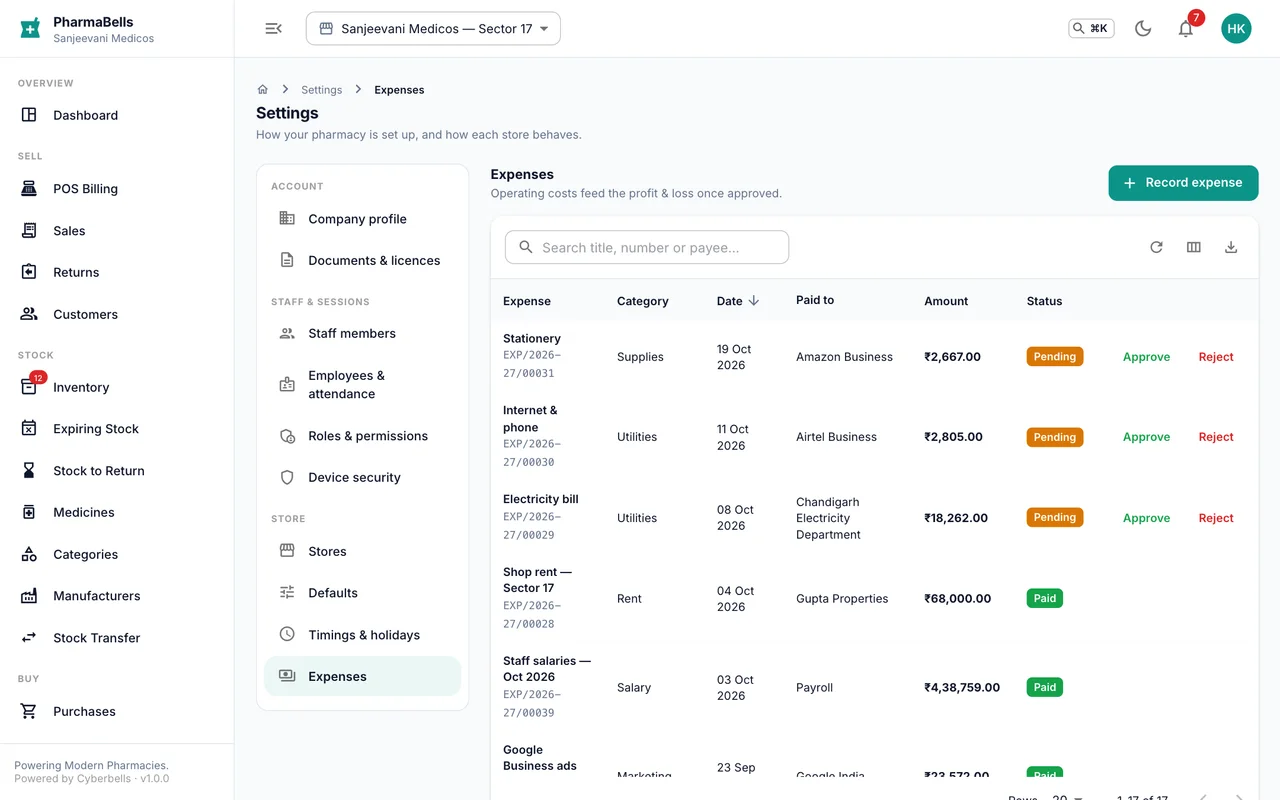
Record one
Settings → Expenses → Add expense (web) or More → Expenses → Add expense (app):
| Field | Notes |
|---|---|
| What was it for | A short title: Electricity bill September |
| Category | Rent, salary, utilities, maintenance, transport, marketing, supplies, tax, licence, miscellaneous |
| Amount | Rupees, including GST if the bill had it |
| Paid via | Cash, UPI, bank transfer, cheque |
| Paid to | The vendor or landlord |
| Date | Defaults to today |
| Recurring | Tick for rent, salaries and the like; the next due date is tracked |
A receipt photo can be attached.
Approve and pay
A recorded expense is pending. Someone with the expense-approval permission (owner, manager, accountant) opens it and chooses Approve or Reject with a reason, then Mark paid when the money has gone. Each state change is logged. On the phone, tapping an expense offers the same actions.
Reports
Expenses by category and month appear in Reports → Profit & loss, next to purchases and sales, so the month's result is real.
Common mistakes
- Recording purchases of medicines as expenses. Stock purchases go through Purchases, where they create batches. Expenses are for everything else.
- Marking paid before the transfer actually went. Mark paid on the day the money leaves; reports date it from there.
Still stuck? akhil.cyberbells@gmail.com